
Artificial intelligence is transforming video creation faster than almost any other area of content production. What once required cameras, actors, expensive editing software, and hours of work can now begin with a simple text prompt.
Whether you’re creating YouTube videos, Instagram Reels, TikTok content, business presentations, advertisements, or educational tutorials, AI video generators can dramatically reduce production time while maintaining impressive visual quality.
This guide explains how AI video generators work, compares the leading platforms, and helps you decide which one best fits your creative needs.
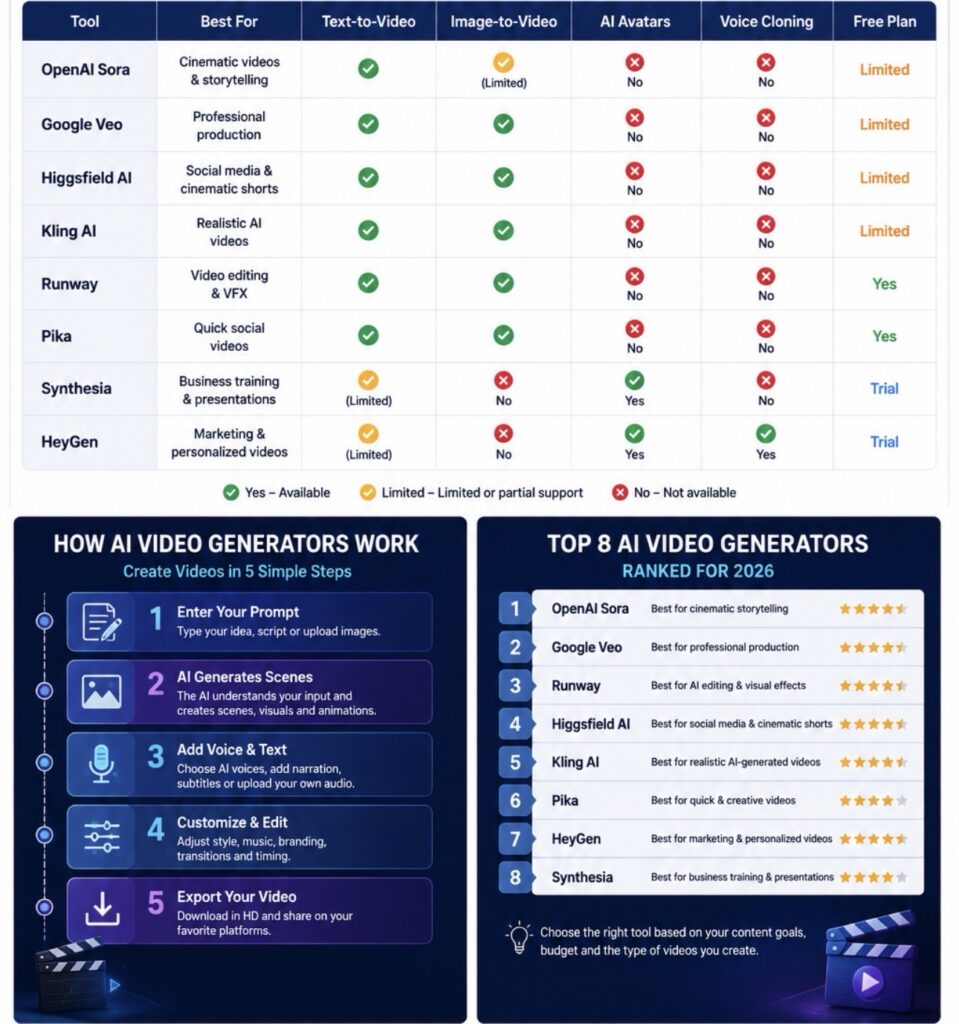
How AI Video Generators Work
- Enter a text prompt or upload images.
- AI understands the prompt.
- It generates scenes, characters, and camera movements.
- Add AI voiceovers or subtitles.
- Edit branding, music, and transitions.
- Export the final video.
Which AI Video Generator Should You Choose?
Top AI Video Generators in 2026
1. OpenAI Sora
Best for:
- Cinematic storytelling
- Long-form videos
- High-quality realism
Key Features
- Advanced text-to-video
- Realistic environments
- Natural movement
- Strong prompt understanding
2. Google Veo
Best for:
- Professional filmmaking
- Marketing agencies
- Creative professionals
Key Features
- High-resolution video
- Natural camera motion
- Excellent prompt accuracy
- AI-assisted production
3. Higgsfield AI
Higgsfield AI has rapidly become one of the most exciting AI video platforms, especially for creators focused on social media.
Best for
- Instagram Reels
- TikTok
- YouTube Shorts
- Viral marketing videos
Key Features
- Text-to-video generation
- Image-to-video animation
- Cinematic camera effects
- AI-generated motion
- Stylish visual effects
- Fast rendering
Why Higgsfield AI Stands Out
Unlike many competitors, Higgsfield AI places a strong emphasis on cinematic movement and visually engaging short-form videos. Its output is designed to look dynamic and social-media ready with minimal editing.
4. Kling AI
Developed by Kuaishou, Kling AI has gained attention for producing highly realistic AI-generated videos.
Best for
- Realistic AI videos
- Character animation
- Creative storytelling
Key Features
- High-quality motion
- Excellent prompt adherence
- Longer AI videos
- Detailed physics simulation
5. Runway
Best for
- Video editing
- AI effects
- Professional creators
Features
- Background removal
- Motion tracking
- AI editing
- Image-to-video
6. Pika
Best for
- Beginners
- Social media
- Short-form videos
Features
- Fast rendering
- Creative styles
- Easy interface
7. Synthesia
Best for
- Corporate training
- Business videos
- AI presenters
Features
- AI avatars
- Multiple languages
- Professional templates
8. HeyGen
Best for
- Marketing
- Personalized videos
- AI avatars
Features
- Voice cloning
- Lip sync
- Translation
- AI presenters
Advantages
- Faster video production
- Lower production costs
- Professional results
- AI voiceovers
- Automatic subtitles
- Social media optimization
- Multiple languages
- Beginner-friendly
Disadvantages
- Some outputs still require editing.
- Premium plans can be expensive.
- Prompt quality affects results.
- Commercial licensing varies by platform.
- Human review is still important for accuracy.
Future Outlook
Future AI video generators are expected to deliver:
- Longer videos
- Improved realism
- Better character consistency
- Real-time editing
- Interactive AI video experiences
- Enhanced multilingual support
- More controllable camera movements
These improvements will continue to expand the possibilities for creators and businesses alike.